How to Use Claude AI For Content Creation
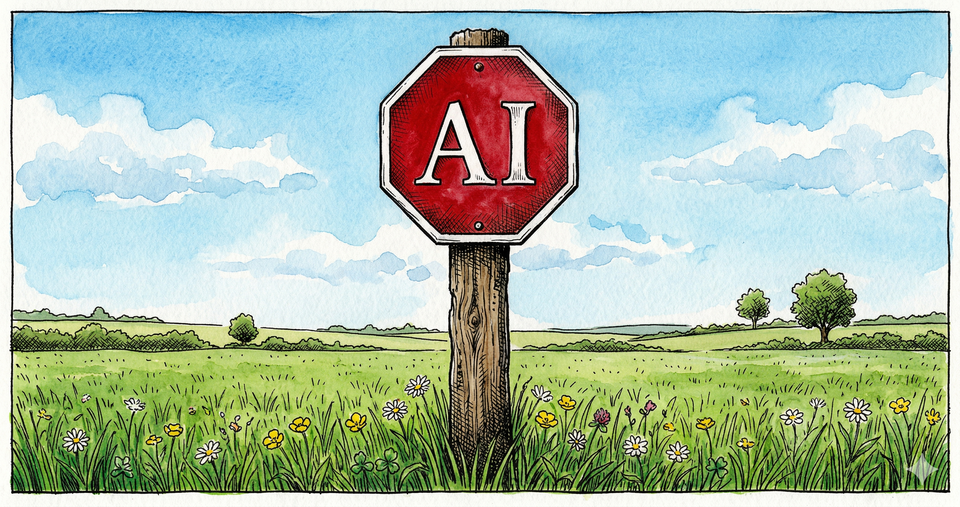
Stop.
Before you use Claude or any other AI for one more piece of content, read this.
The other day I'm sitting on the couch and I noticed something trending. Everyone's talking about Frank Kern. I went through a four step Claude writing workflow on my phone while watching TV with my wife and had an article published within 15 to 20 minutes.
You can do the same to drive more traffic to your blog.
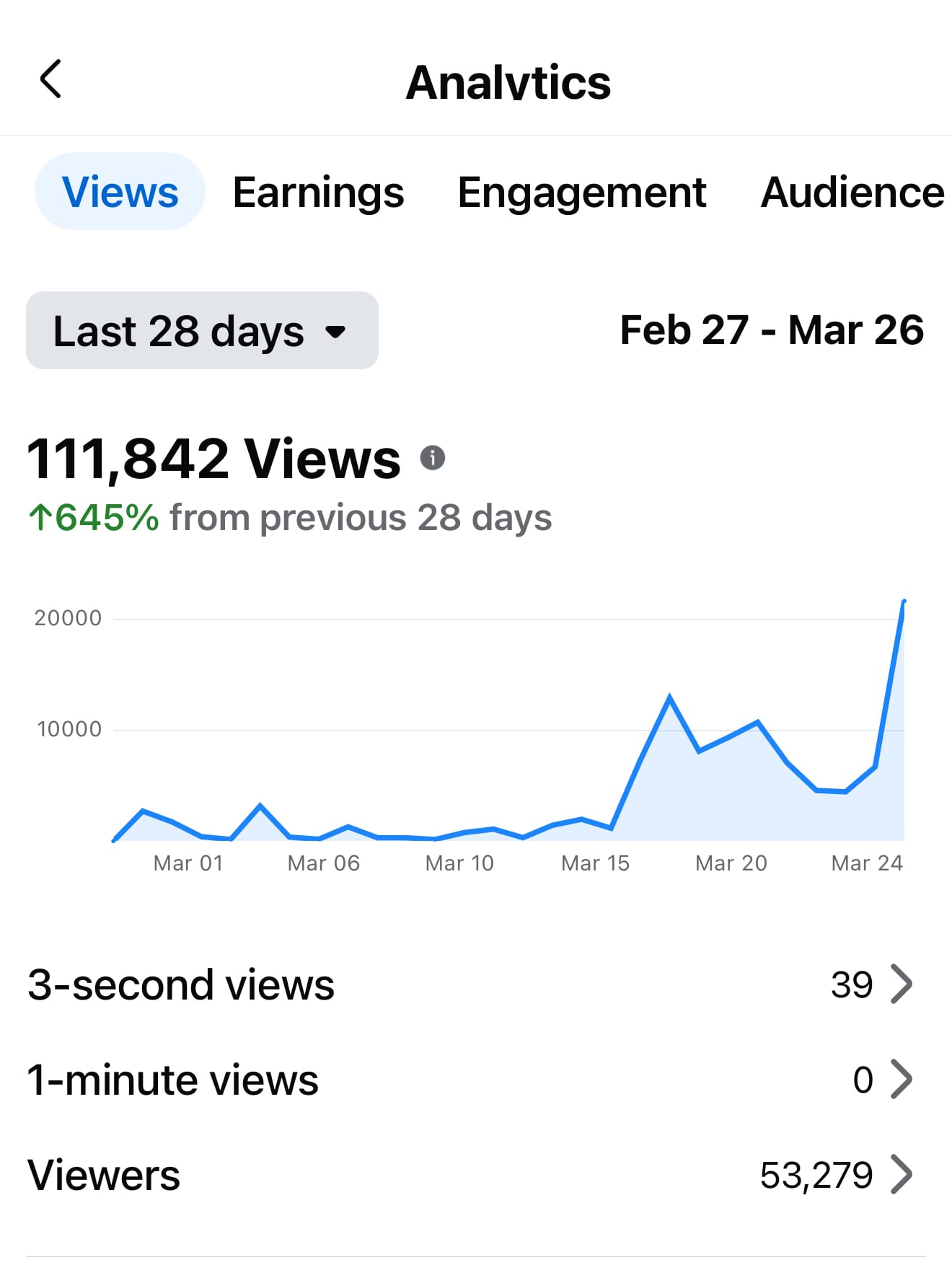
- Totally my voice.
- Totally my vibe.
- And it totally jumpstarted my Facebook growth
That's a whole lot of "totally." But here's what matters. It's the step-by-step Claude workflow system that changes the output. And I'm about to give you seven of them.
- Writing a blog post, email, or even a book.
- Deep research to understand your audience and connect with them.
- Creating brand guidelines and images for your brand.
- Keyword research and audience discovery so you can grow.
- Social media content that drives great engagement.
These workflows work on your phone, on the web, or on your desktop. If you want more control, you can build a full system around Claude that takes the output even further, I'll be covering exactly how to make that happen soon.
But this article is the foundation. Everything starts here with simple content workflows.
First up: writing. Four steps. The last one is the one most people skip, I know cliché. But you'll see it, once you read it.
Writing with Claude Can Supercharge Your Marketing
It always comes back to words. Blog post, book, video script, newsletter.
Words.
And when it comes to words, Claude is one of the best AI tools available. It writes more naturally, follows complex instructions without drifting, and produces output that sounds like a human wrote it.
This is the opportunity. Because once you start creating a workflow, you'll understand how to create quality content faster. Without losing your voice and it opens up all kinds of opportunities. Your own blog website, better articles. YouTube scripts, social media posts. Again all words, here's how.
Do This:
Start a new session. Tell Claude what you're trying to create and who it's for. Be specific. The more specific the better.
1) Know what Claude knows. Ask Claude what it knows about your topic before writing a single word.
2) Make it search. Tell Claude to go out on the web and find real, current information about your topic. This one step dramatically improves the writing because now it's built on actual research, not just what Claude already knows.
3) Claude writes the draft. Ask Claude to write the draft. Be specific. Tell it who the target audience is, how long the piece should be, and what platform you're publishing on. Claude will give you something solid, well structured, but it won't sound like you yet. That's fine. That's what the next step is for.
4) Add your story. This is the step most people skip and it's the most powerful. Open your phone, spend five minutes voice dictating your own thoughts, ideas, and experience. Then have Claude rewrite the draft with your voice woven in. This is what makes it yours.
The result: You publish faster and the output still sounds like you. The first time I did this effectively, I wrote a Facebook post that wasn't even optimized. It wasn't perfect. But because it tapped into this process, it drove over 20,000 views.
Want to go deeper? The detailed step-by-step article that covers how to write with Claude to get fantastic results that are authentically you.
Using Claude for Deep Research
What if Claude could tell you exactly what your audience is struggling with, what they're searching for, and what content will actually get discovered? Before you create a single piece. Claude just knew.
Research and strategy. That's what's allowed me to make a full-time living online for 20+ years. It starts with understanding your audience and what they'll be more likely to click and engage with.
Audience Research
The more you understand who you want to reach, the easier it is to create content that speaks directly to them. Claude can go incredibly deep with this. Below, you'll find the simple step-by-step formula to get started with.
Do this:
1) Tell Claude to interview you. Start by giving Claude context. Tell it how old you are, what kind of content you create, what you offer, how you want to make money, and what your plan is. Then tell Claude to interview you to get detailed information about your ideal potential target audience.
Let it ask questions, push back, and dig deep. The more specific you are, the better. The more general, the worse off you're gonna be because Claude doesn't have anything to go on. Garbage in, garbage out.
You can do this on your phone at the park.
2) Send Claude to research. Once you have the basics, have Claude search Reddit, YouTube comments, and forums to understand your target audience better. What are they asking? What are they struggling with? Who are they following? Also have Claude research competitors or creators already serving your niche. What's working for them? Use all of that to extract who the audience really is.
3) Define who you're NOT for. Think about who you really want to reach and the kind of content you really want to create. Then ask Claude to help you define who you're not for. This is powerful. When the right people read your stuff, you might say things most people don't want to hear. But the right people will love it.
4) Evaluate the avatar. Have Claude describe your perfect target audience avatar back to you. Read it. Do you agree? Adjust what doesn't feel right. Once it's dialed in, tell Claude to save it to memory. Now every time you reach for Claude, it already knows who you're talking to.
You can create a more powerful version of this by accessing your computer and having Claude save simple text documents (markdown files .md).
Content Discovery
You know how to write with Claude. You both know who you're writing for. But how you create the content matters just as much. Maybe more. This is what helps you stand out and get discovered.
Here's the good news. This works across most platforms YouTube, Facebook, Blogging, because the psychology of what connects is the same.
Do this.
Start a new session. Tell Claude your goal is content that gets shared, triggers engagement, and gets people to subscribe or buy. Tell Claude you have a framework and you want its help working through it step by step.
1) Tell Claude who you're trying to reach. Ask Claude to help you identify the difference between the people already following you and the people you're trying to connect with for the first time. What does each group need from you?
2) Ask Claude what type of content fits. Give Claude your topic and ask it to recommend which content type will drive the most engagement. The main types that work:
- A. New information. Be first, be current.
- B. Proof and results. Case studies, numbers, show what happened.
- C. Vulnerability. Meet people where they're at. Scary but it works.
- D. Contrarian takes. Challenge what people believe. Forces a reaction.
- E. Behind the scenes. Show how things actually work. Feels exclusive.
3) Ask Claude to make it about them. Give Claude your draft or idea and ask: is this about me or about the reader? Tell Claude to reframe it so the reader sees themselves in it. Start with "imagine" or "have you ever struggled with..." Meet them in their experience first.
4) Ask Claude about the platform. Every platform rewards different behavior. Ask Claude to break down what drives engagement on the specific platform you're publishing to.
5) Ask Claude for a visual concept. Tell Claude what the piece is about and ask it to suggest a visual that tells the story. The more the visual speaks, the better the content performs.
The result: You walk away with a clear plan for what to create, how to angle it, and where to publish it. Save it to Claude's memory so next time you're ready from the start.
I created a post about AI and started with the word "stop." Claude suggested pairing it with a stop sign image, but with "AI" on it instead of "stop." That one idea made the post hit harder. This is what happens when you keep asking Claude "how do we improve this." It sees things you miss.
One strategy I'm implementing: focus on one strong piece, distribute it across platforms over a few days, then move on. Super powerful, will also be writing about this soon as well.
Using Claude for Keyword Research
If you've got a website or you're on YouTube and want to grow, keyword phrases matter as much as they ever have. Some of the biggest YouTubers who cover niche topics. What are they covering? Tech YouTubers and bloggers, same thing.
Keyword phrases.
A great title contains two things:
A target keyword phrase.
A compelling element that makes it highly clickable.
I've built several keyword research skills for Claude. Some of them require the desktop setup. But here's one you can do right from your phone, which I often do.
Do this:
1) Pick a keyword phrase. Start a new session. Give Claude a keyword phrase you're thinking about creating content around.
2) Search Google together. Ask Claude to search Google for that exact phrase. Look at who shows up on page one together.
3) Check for walls. Are big authority domains taking up the top spots? Facebook, Forbes, official brand pages. The more of these you see, the harder it is to rank. If the top results are all big brands with well-targeted titles, that phrase might not be worth your time.
4) Look for openings. Forum posts, Reddit threads, Quora answers on page one. That's gold. It means people are searching for this but nobody has written a real article yet. That's your opening. The more of these you see, the better your chances.
5) Check the titles. Are the top results actually targeting your exact phrase in their title? If nobody has your exact phrase in their title, that's a huge advantage. You write the article with the perfect title, you win clicks.
6) Build your title. Take the winning keyword phrase and ask Claude to help you build a compelling, clickable title around it. The keyword phrase gets you found. The title gets the click.
The result: You know whether a keyword phrase is worth going after before you create a single piece of content. No guessing.
I've also built skills that score all of this automatically, plus skills for finding keyword phrases in the first place. I'll be posting the exact system I use and the skills I created. Subscribe for free and you'll be the first to see it.
You've got the keyword phrases. Now how do you turn them into something people actually click?
Research: Article, Blog & YouTube Titles
Time to turn those keyword phrases into something people click. Your video packaging. The topic, the title, the thumbnail. That's everything.
Do this:
1) Start a new session with your keyword phrase. Tell Claude: "I need compelling titles for this keyword phrase: [your phrase]. Act like a tabloid headline writer. Every title needs to stop someone mid-stride."
2) Set the rules. Tell Claude: keep it under 60 characters, one clean phrase with no colons or dashes, make it emotionally charged. Curiosity, fear, desire, shock, urgency. Be specific, not vague. Vary the angles: warnings, secrets, mistakes, gains, revelations.
3) Generate a lot. Ask Claude for 20 to 30 options. Most won't be great. That's by design. You're looking for the 3 to 5 that hit hard.
4) Pick and refine. Choose your favorites and ask Claude to tighten them. Make sure the keyword phrase is still in there naturally. The keyword gets you found. The emotion gets the click.
5) Thumbnail concept. Once you've got the title, ask Claude to suggest a visual concept that tells the story in one image. Simple, bold, instantly recognizable at thumbnail size.
The result: A title and thumbnail concept built to perform. Keyword phrase baked in, emotionally charged, and designed to stand out.
Bonus: Once you have the title, ask Claude what visual image would get people to stop, pay attention, and click. This works for thumbnails, blog images, Facebook posts, and more. Coming up, we'll talk about creating brand images. Combine that with this and you've got a powerhouse result.
You've got the research, the keywords, and the titles. But where does all this content actually live?
Using Claude for Social Media (Facebook)
Everything I share I do myself. Over the last few weeks I've been dialing in my Facebook presence using AI. Image generation, trending topics, and my authentic voice.
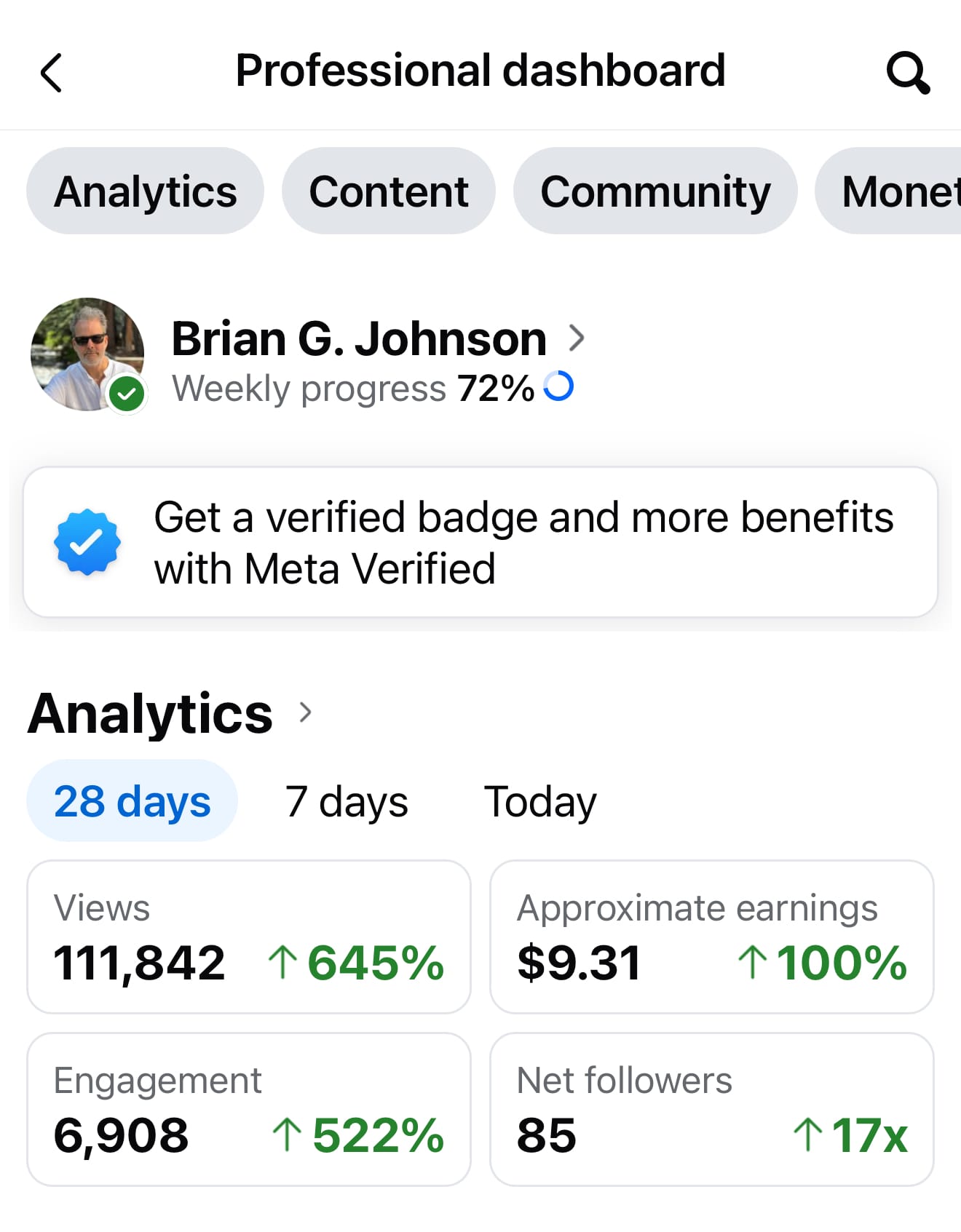
In the last 28 days my views are up 645%. The goal isn't to make money from Facebook, the extra few bucks is nice for sure. But, it's to learn how to create engaging content.
Today while writing this article, I asked Claude what was happening in AI. It told me OpenAI just canceled a feature. I posted about it in minutes. Yesterday I did the same when OpenAI canceled Sora. That post hit 5,720 views because it was trending.
Remember the content types from earlier?
Here's what that looks like in practice. My wife and I brought a kitty home. I knew that would do well. People love cats. It's broad, it's cute, it performed. Trending news also works. I published about OpenAI canceling Sora and it blew up. Vulnerability. I published a post about Frank Kern where I was genuinely vulnerable and it took off. Knowing what to create and when makes all the difference.
Do this:
1) Play your hand. Don't wait around for a trending news article. You've got content types that work: proof, vulnerability, contrarian takes, behind the scenes. Play your hand with what you've got. But when something pops, a trending story, breaking news, pivot and cover it fast.
2) Ask Claude what's happening. Tell Claude your niche and ask what's trending. Also ask what's slightly broader that still applies. Trending topics move fast. Post quickly while it's hot.
3) Create the post with Claude. Keep it short for social media. Tell Claude the content type, the topic, and your audience avatar. Ask for a compelling visual concept to go with it.
4) Learn from the data. Use your platform's dashboard to see what actually worked. Which content type performed best? Which topics drove engagement? Use that to inform the next post.
The result: You're posting consistently with a system, not guessing. Each post teaches you something about what your audience responds to.
You've got the words, the strategy, and the posts. There's one piece that ties it all together visually. And you don't need design skills to nail it.
Using Claude for Image Prompt Generation
Claude doesn't generate images on its own. But it can jumpstart the process. If you're writing a blog post or creating a video script, you're already generating data that can fuel image generation. I use Claude to build detailed image prompts and then take those prompts to Gemini (Nano Banana) to generate the actual images.
Do this:
1) Tell Claude what you need. Start a session. Describe the image you want. What's the topic? What feeling should it create? What's it for? A thumbnail, a blog post, a Facebook post?
2) Let Claude build the prompt. Claude will create a detailed prompt designed for image generation. The more specific you were in step 1, the better the prompt.
3) Take the prompt to Gemini. Copy Claude's prompt and paste it into Gemini (Nano Banana 2 Pro works great for illustrations and text rendering). Generate the image.
4) Refine with Claude. If the image isn't right, go back to Claude. Tell it what didn't work. Too busy? Wrong color? Not simple enough? Claude adjusts the prompt and you try again.
5) Lock your style. Once you find a visual style that works, have Claude save it as a style spec. Now every image follows the same rules. Same look, same feel, every time.
The result: You can create on-brand images from your phone in moments. No design skills needed.
You made it this far and I'm excited for you to try these out. I keep honing and improving these whether I'm on the go with my phone or using my desktop Claude system. Subscribe for free. More workflows, skills, and detailed systems on the way.

Content strategist, author of Trust Funnel and Tube Ritual, and YouTube Silver Play Button recipient with over 25 years of experience helping creators build audiences online. He writes at FutureCreators.tv.
Member discussion